A product photograph proves a product exists. A 3D configurator proves it can look a certain way. Neither answers the question that stalls a large share of considered purchases: does this fit in my space, on my body, in my room, at my scale?
AR product preview answers exactly that. A shopper points a phone camera at their living room and places the sofa in it — at true scale, in their light, against their floor. For categories where spatial fit is the deciding factor, removing that question removes the last hesitation before checkout.
This article covers what web AR actually does, how support differs between iOS and Android, and where it earns its place in a product page.
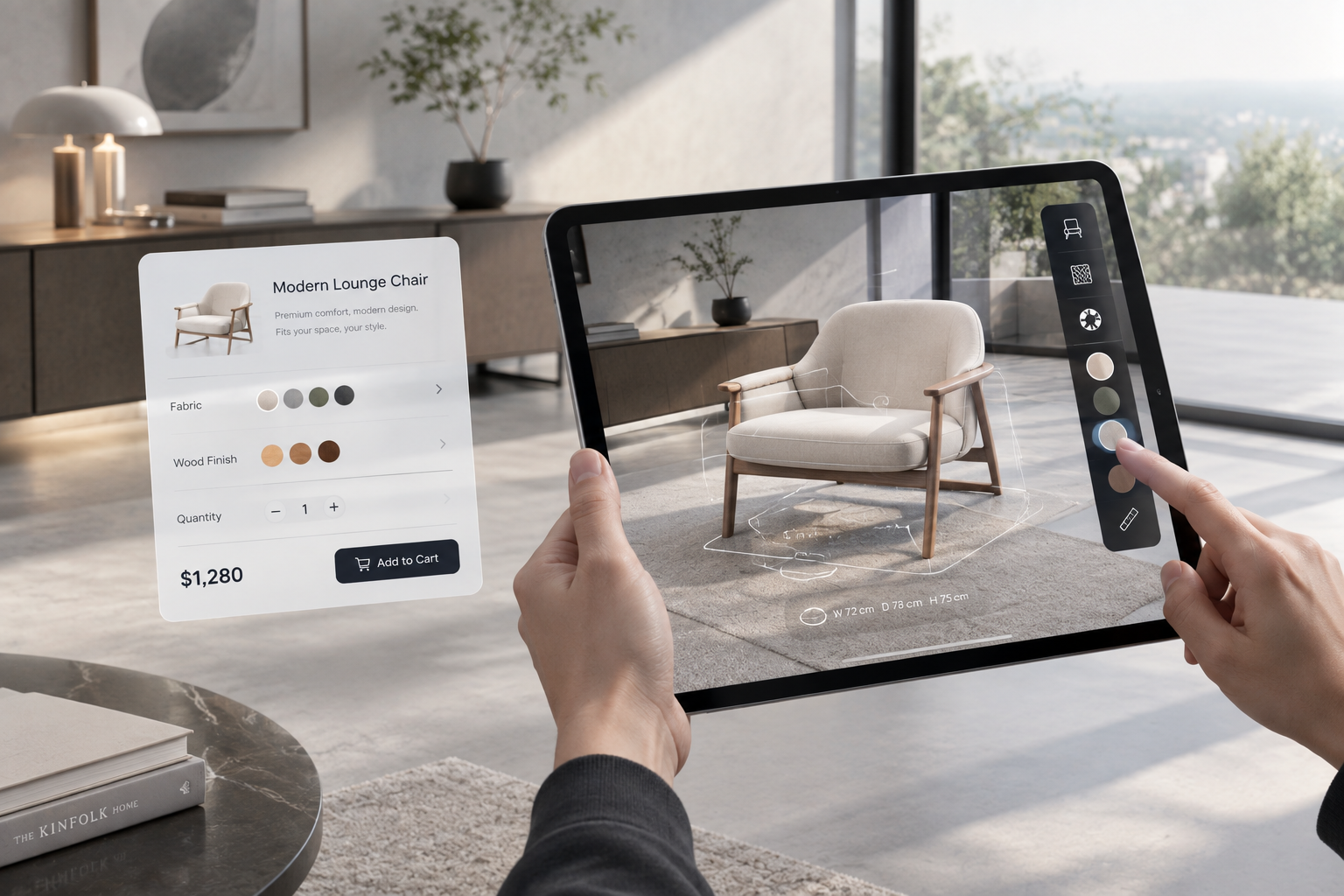
What AR adds that 3D alone does not
A 3D configurator lets a buyer explore the product. AR lets the buyer explore the product in context.
The clearest case is furniture. A shopper with oak floors and cool afternoon light is looking at a warm-toned sofa. A product page cannot tell them whether the beige reads as beige in that room, whether the proportions work against their wall, or whether the footprint leaves a walkway. AR can, because the sofa is rendered into the actual room rather than onto a white background.
That matters commercially because large-item returns are expensive in a way that small-item returns are not. The National Retail Federation’s 2025 Retail Returns Landscape puts total retail returns at $849.9 billion for 2025 and estimates 19.3% of online sales will be returned. For bulky goods, reverse logistics and refurbishment push the cost per return far above the average — which is why catching a mismatch before purchase is worth more than processing it efficiently afterwards.
How web AR actually works (and the platform caveat)
The most common misconception about AR in ecommerce is that it requires an app. Modern web AR runs in the browser. But “runs in the browser” does not mean “one technology everywhere”, and this is the part most vendor pages gloss over.
On Android, AR sessions are delivered through the WebXR Device API, supported in Chrome via ARCore, with Scene Viewer as a fallback path. This is the smoother of the two platforms.
On iOS, Safari does not run WebXR AR sessions. Apple’s route is AR Quick Look, which renders a USDZ file over the camera feed. In practice this means iOS support comes from serving a USDZ asset, not from a WebXR session.
MDN documents the WebXR Device API as experimental technology, with an explicit warning to check the browser compatibility table carefully before using it in production. We treat that as the honest baseline: plan for two delivery paths rather than assuming one standard covers every device.
The practical consequence for a build is that you are shipping three assets, not one — a GLB for the interactive 3D experience, a USDZ for iOS AR, and the web AR path for Android. Shopify handles part of this: it accepts GLB and USDZ model files, and automatically converts GLB to USDZ so a single upload covers both platforms. On other stacks, that conversion is part of the build.
What a good AR preview does
True scale. The model is authored at real dimensions and anchored to the camera feed, so the product holds its position as the shopper moves around it. A preview that renders at wrong scale is worse than no preview, because it produces confident wrong decisions.
Configuration continuity. Whatever the shopper selected in the configurator — colour, material, options — carries into the AR scene unchanged. This is the single most valuable connection between the two features: the buyer does not have to re-specify anything.
Lazy loading. AR assets load on demand. A product page should not pay a download cost for a feature most visitors will not open.
Cross-device testing. Scale and tracking behave differently across devices and lighting conditions. Testing is part of the work, not a final checkbox.
Which categories benefit most
| Category | What AR resolves | How it appears |
|---|---|---|
| Furniture | Footprint, proportion, tone against existing finishes | Placed in living room, bedroom, study |
| Lighting | Fixture scale, colour temperature, dropped height | Hung above a table or against a wall |
| Decor and objects | Proportion and styling against a surface | On a shelf, table or windowsill |
| Jewelry | On-body appearance, metal tone against skin | Ring on hand, pendant worn |
| Eyewear | Frame shape against face, lens tint | Try-on with face tracking |
| Bathroom and kitchen | Fit and layout in a constrained space | Placed in the actual room |
For furniture the technique overlaps heavily with material rendering — see our furniture configurator notes for how fabric and wood are handled. For jewelry, the on-body case is covered in our jewelry configurator notes.
A sequence that works
AR delivers the most when it sits at the end of a configuration flow rather than standing alone:
- The shopper configures colour, material and options on the product page.
- One action moves that exact configuration into the AR scene.
- Having seen it in their own space, they add to cart — with the configuration data carried into the order.
The sequence compounds: engagement in the configurator, certainty from AR, and no installation barrier between the two.
Honest limits
AR preview is not a universal upgrade. It earns its cost where space and scale are the decision — furniture, lighting, large appliances, worn goods. For a product whose dimensions are standard and whose appearance is adequately conveyed by photography, an AR module adds engineering cost without changing the purchase.
It also depends on the buyer’s device. iOS and Android take different technical paths, and older hardware will fall back to the standard product page. AR should be an enhancement layered on a page that already works, never the only way to evaluate a product.
FAQ
Do shoppers need to install an app? No. Web AR runs in the mobile browser. On Android it uses WebXR; on iOS it uses AR Quick Look, which renders a USDZ file over the camera feed.
Is AR support identical on iOS and Android? No, and any vendor claiming otherwise is simplifying. WebXR — which MDN still marks as experimental — is not available as an AR path in Safari on iOS, so iOS is served through USDZ instead. A production build ships both.
How accurate is the placement? Scale accuracy comes from the model being authored at true dimensions. Provided that is done correctly and anchoring is stable, the product holds its position convincingly as the shopper moves. Cross-device testing is what catches the cases where it does not.
Can we launch AR without a full configurator? Yes. AR can be added as a standalone module and expanded later. Because the same 3D assets serve both, adding a configurator afterwards does not mean rebuilding the models.
Which categories should skip it? Products whose dimensions are standardised and whose appearance is fully conveyed by photography. In those cases the engineering effort is better spent on the product page itself.
Next step
If you sell furniture, lighting, large appliances or worn goods, the useful question is not “should we add AR” but “which products lose the most buyers to fit uncertainty”. That is usually a short list, and it is the right place to start.
Tell us which products those are and how your catalog is structured, and we will tell you what an AR module involves on your stack — including whether it is worth doing at all.