A Shopify product page is a good place to sell a product and a poor place to explain one. The theme gives you media, description, variants and a buy button — none of which can answer the question a buyer actually has when a product comes in several finishes: what does the one I want look like?
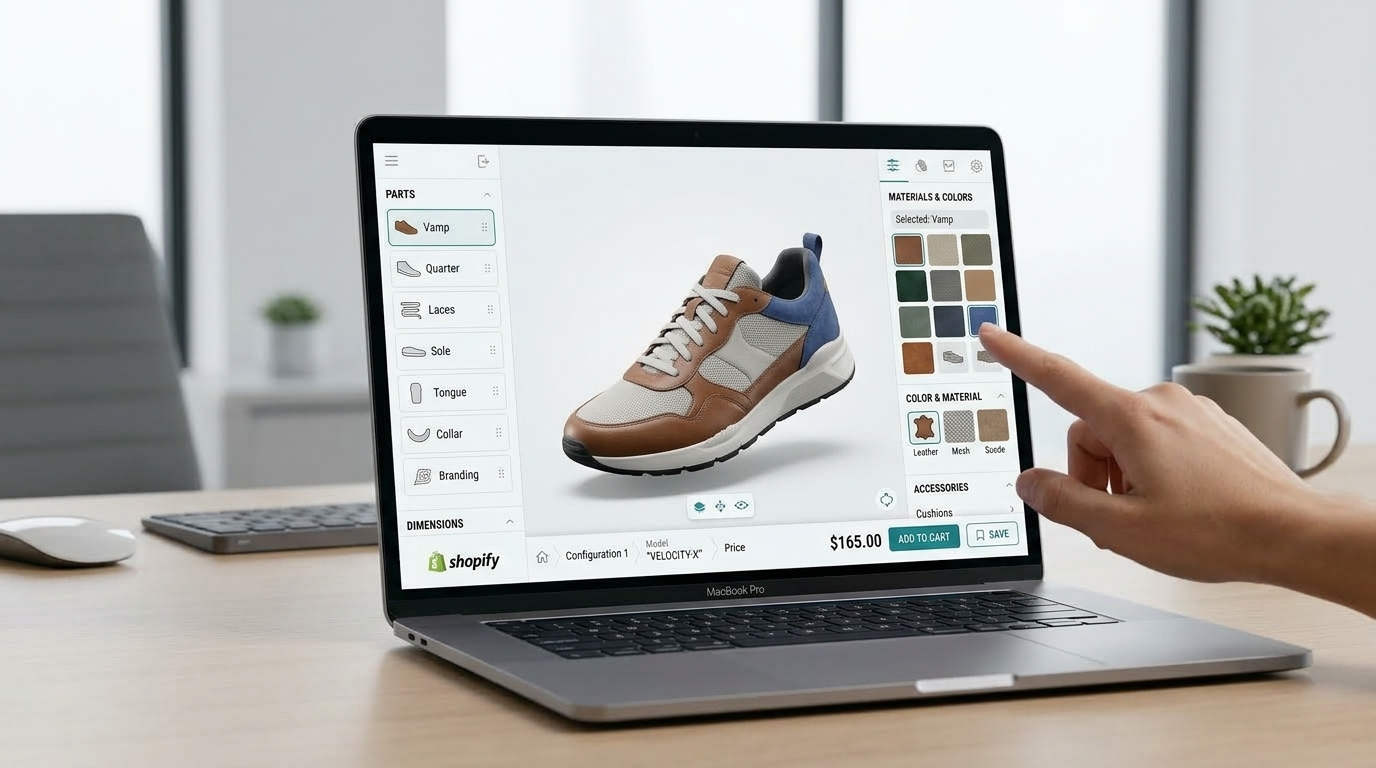
A Shopify 3D configurator answers it on the page. The shopper changes colour, material, size or options, the render updates live, and the configuration they build is the configuration they order.
This article covers how Shopify handles 3D media natively, what a configurator build actually involves, the trade-offs between the available routes, and how to decide whether it is the right spend for your catalog.
The hidden cost of a single product photograph
Every static product image tells a one-directional story. It says “the product looks like this”. It cannot say “the product looks like this in your room, with your finishes, built to your specification”.
The commercial consequence is visible in returns data. The National Retail Federation’s 2025 Retail Returns Landscape estimates 19.3% of online sales will be returned in 2025, against $849.9 billion in projected total returns, with 9% of returns identified as fraudulent. The rest are largely legitimate — and the dominant cause is not damage but a mismatch between expectation and delivery.
For cross-border sellers the arithmetic is worse, because a return carries international freight and customs handling in both directions. Reducing the number of returns matters more than making each one cheaper, and the lever that reduces the number is resolving the buyer’s uncertainty before checkout.
What Shopify supports natively
Shopify’s platform already handles a substantial part of the technical groundwork, and it is worth knowing exactly where the platform ends and a build begins.
Shopify accepts 3D models in GLB and USDZ. GLB is the standard format for interactive 3D on product pages, accepted up to 500 MB, with anything over 15 MB automatically optimised. USDZ is Apple’s format for AR on iOS, and Shopify converts GLB to USDZ automatically, so a single upload covers Android and iOS. The Shopify mobile app also includes a built-in 3D scanner that produces a model in 10 to 15 minutes across three scans, for merchants whose products suit scanning.
What the platform does not do is give you a configurator. Uploading a GLB gives you a rotatable viewer — useful, but it shows one fixed configuration. Real-time configuration across colour, material, dimension and options, with rules between them and pricing that recalculates, is custom work layered on top.
What the evidence supports
Shopify publishes merchant case studies on its own domain, which makes them checkable rather than second-hand.
In the Rebecca Minkoff case study, the brand added 3D models and AR across more than 50 product pages. Shoppers who viewed a product as a 3D model were 44% more likely to add it to cart, and those who viewed it in AR were 65% more likely to make a purchase. In the Oakywood case study, the brand reported average order value increases of 458% in Germany, 232% in Switzerland and 84% in the UK, and custom orders rising from near zero to roughly 200–300 per month.
These are individual merchant results, published by Shopify, in specific markets with specific product mixes. They are not industry averages and they are not our results. We cite them because a buyer evaluating this decision deserves a source rather than an assertion — including a source that is honest about being a case study.
How a configurator works on a Shopify store
It runs in the browser with nothing to install. Configurators are built on WebGL, which MDN documents as supported in all modern browsers. That matters on Shopify specifically: an app-store plugin or an off-site viewer interrupts the funnel precisely at the moment of decision. The configuration happens on the product detail page, in place.
Materials respond to light. Configuration built on physically based rendering (PBR) simulates light interaction rather than tinting a flat image. Metal, wood, leather, fabric and plastic each behave differently — brushed steel does not read like polished chrome, linen does not drape like velvet. The gap between a flat-colour swatch and a material that behaves is the difference between a feature that resolves doubt and one that merely looks modern.
Configuration flows into the order. The buyer’s selection carries into the cart and order as structured data rather than being re-keyed. Where the product is made to order, that data can also be exported downstream to production — the point at which mis-specified orders usually originate.
It loads lazily. The 3D module should download when a shopper opens it, not on page load. A configurator that damages your Core Web Vitals has traded one problem for another.
Deciding whether your store needs one
Four questions, answered honestly, are usually enough.
- Do your products have real configurable options — colour, material, size, components, engraving?
- Is your order value high enough that a single return is painful? Roughly, above $80–100 the cost of a return starts to bite.
- Is your return rate elevated, with reasons clustering around “not as described”, “wrong colour” or “wrong finish”?
- Do you sell personalised or made-to-order products that buyers currently cannot preview at all?
Two or more “yes” answers suggest the expectation gap is already costing you money. Typical fits include jewelry, eyewear, watches, furniture, footwear, configurable electronics and automotive parts. If you sell a single high-volume SKU with no options, a configurator is probably overkill — and we would rather say so early than take the project.
Three routes, compared honestly
Subscription apps install in minutes and bill monthly. They handle straightforward colour-swapping well. Their constraint is depth: you configure inside someone else’s template, complex option logic is often out of reach, and your configuration data lives with the vendor. Pricing varies by app and tier — check current listings rather than relying on figures quoted at second hand.
Enterprise CPQ platforms are built for very large catalogs and complex pricing rules, and licensed to match. They suit organisations with the internal teams to operate them. For a mid-sized brand the overhead rarely fits.
Project-based custom development builds around your catalog: your materials, your rules, your product data. You pay once for the build rather than subscribing indefinitely, and the configuration data — including any production export — belongs to you. This is the route we take, and it is the right one when configuration is part of how you sell rather than a cosmetic addition.
What a project involves
We do not publish fixed prices or fixed timelines, because both are driven by variables that are unknown until your catalog is mapped — model count, material complexity, how many rules govern the options, and how your storefront is themed. A number quoted before those are established would be invented rather than estimated.
A project typically moves through four stages:
- Scope mapping. You bring your top products; we map options, materials, rule logic and integration points, then confirm what is feasible.
- 3D production. Models are built or optimised from existing CAD or GLB assets, and materials are set up.
- Storefront integration. The configurator is embedded on your product pages, with cart and order flow connected.
- Launch and iterate. Configuration data starts feeding merchandising decisions. AR placement can be added where buyers need to see the product in their own space.
FAQ
App or custom development — which should I choose? If your budget is tight, your needs are simple colour-swapping, and a permanent monthly fee is acceptable, a subscription app will do the job. If you need configuration logic the templates cannot express, want to own the data, and want a production export, a project build is the better fit for most growing brands.
Does it work on mobile? Yes. Because it is a browser-native WebGL module, it runs on iOS and Android without an app install. Touch interaction and loading behaviour are part of the build, not an afterthought.
Will it slow my store down? A correctly built configurator loads lazily, so the module only downloads when a shopper opens it. Performance work is part of the engagement.
Can we supply our own 3D models? Often, yes. Existing CAD or GLB assets can usually be converted and optimised. Where they do not exist, model production is part of the scope.
Does Shopify support the file formats involved? It does. Shopify accepts GLB and USDZ, optimises GLB files over 15 MB automatically, and converts GLB to USDZ for iOS — so one upload serves both platforms.
Can it connect to production? For made-to-order products, yes. Configuration output can be structured for downstream systems so the specification chosen on the storefront matches what gets built.
Next step
The question worth asking is not whether 3D works — Shopify’s own case studies address that. It is which of your products currently lose the most buyers to uncertainty about finish, material or configuration.
Send us that shortlist and how your catalog is structured, and we will tell you what a build would involve on your store, including whether a configurator is the right answer for your catalog at all.